Using Technology to Teach Geometry
Introduction: A hands-on, student-centered approach to facilitate the learning of quadrilaterals for 2nd Grade students that addresses Arizona State Standards (2.G.A.1): Recognize and draw shapes having specified attributes, such as a given number of angles or a given number of equal faces. Identify triangles, quadrilaterals, pentagons, hexagons, and cubes. During this lesson, students will create models of six kinds of quadrilaterals: square, rectangle, parallelogram, trapezoid, rhombus, and kite. The objectives of this lesson are:
ISTE Standards:
Materials:
After students spend time creating each shape, students' knowledge and understanding of quadrilaterals will be formally assessed with Flashcards by NKO application.
Instructional Preparation: In order to deliver this part of the lessons, teachers must download and sign up to use the application. Creating the flashcards themselves can be time consuming since users need to upload the pictures, which often requires searching for images and saving them to their device.
|
Quadrilaterals Song (Radioactive) by Mr. Peters' Classroom
After watching the Quadrilaterals Song (Radioactive), students will learn how to create quadrilaterals on student tablets, Chromebooks, or laptops using Geoboard:

One great thing about Geoboards is that this resource can either be downloaded as an app onto devices, or be accessed via website and pulled up right in a web browser!
Formative Assessment: Teachers can informally assess students' artifacts after each shape by asking students to show their work. Teachers can take advantage by having students compare their own shapes with their classmates and self-assess or peer-assess their work.
 Summative Assessment: During this lesson, a class deck of quadrilaterals was prepared to assess students' comprehension of the six different kinds of quadrilaterals by using the matching game. Once a classroom deck is created, or students create their own decks (student artifacts) and practice learned content by playing other engaging games independently, in small groups, with a partner, or compete with all of their classmates. The application permits teachers to view each individual student's progress. Below are screenshots of student artifacts during the final assessment using Flashcards by NKO. To assess summatively whether students comprehended the content of the lesson, the created flashcards include shapes and imagery of quadrilaterals found in real life to match with the correct name or text. For English Language Learners or students with disabilities, the application provides accommodations through text-to-speech options in settings.    
As students play games with classroom decks, teachers can monitor and track each individual students' achievement for informal and formal assessment.
Conclusion: This lesson was designed for the teacher to begin with applying direct instruction and end with facilitating student learning. Direct instruction is applied in the beginning of the lesson while introducing quadrilateral shapes through the introductory video and using online geoboard. The teacher will then act as a facilitator of student learning when students apply their knowledge of the lesson through the use of the digital flashcards. After teaching this lesson to a group of adult learners and observing their engagement and interest in using both digital resources that would be integrated for second grade state standards, it is of my own personal belief that the age group for which this lesson was created would be not only engaging and fun for second graders, but would also be beneficial towards mastery of the content, thus allowing the teacher to progress on to other geometrical shapes contained with this standard.
Peer Reflection Survey
Please click on the link to access my Peer Reflection Survey to provide feedback so that I may improve the quality and effectiveness of this lesson plan and my presentations.
 |
Wednesday, November 30, 2016
Micro Lesson 1

Wednesday, November 16, 2016
In Class Micro Lesson Artifacts
Fellow classmate, Stephanie Gilbert's, lesson plan presentation integrated using online resource SmartDraw. Here is the Southwest Statehood Timeline that I created in class using this student-centered technology in the classroom resource:
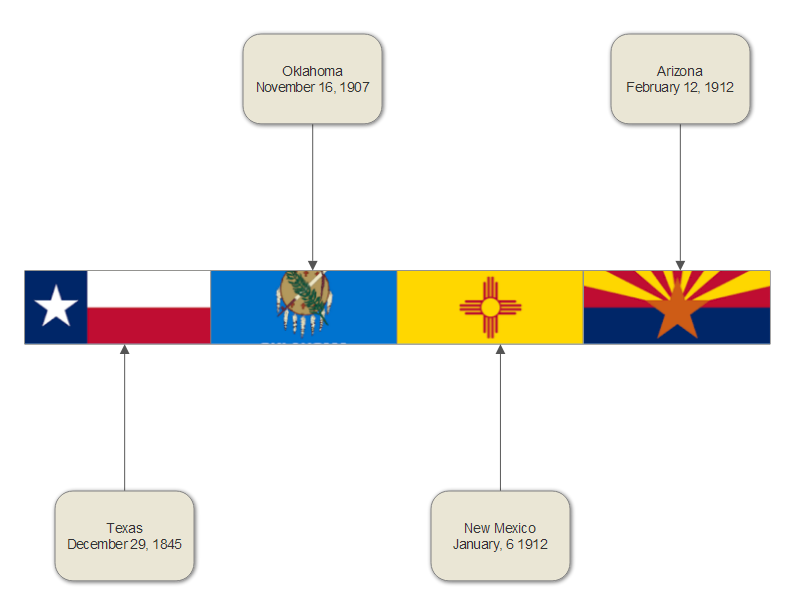
After a brief free trial, students can use this resource to create several different artifacts that can be used to evaluate their learning with a subscription fee. Here's a quick video that shows some of the things that you can create using this site:
After a brief free trial, students can use this resource to create several different artifacts that can be used to evaluate their learning with a subscription fee. Here's a quick video that shows some of the things that you can create using this site:

Wednesday, November 2, 2016
Resource Integration Presentation (Refection Included)

Integrating Pixie in the Classroom Presentation
Reflection:
Integrating Pixie into the classroom is appropriate for elementary learning environments for all students. The program was designed to engage students in curriculum projects from kindergartners until 5th grade. My presentation included displaying and discussing artifacts that students can create using this resource throughout all elementary grade levels. Pixie was designed by Tech4Learning to be used by diverse learners in all learning environments. I would not recommend integrating this software into the classroom for students if the teacher has not spent time familiarizing their self with the technology first. While the software provides Universal Design for Learning for all students, teachers can modify usage of the technology to support students with both learning and emotional needs.
"Wixie and Pixie provide platforms for students to showcase their ideas and feelings using the same tool as their peers." -Tech4LearningWhether teachers have students that fall on the Autism Spectrum, have social-emotional disorders, speech disorders, are second-language learners, every exceptional child will be able to demonstrate and showcase their learning through this software. The software even offers settings and options that teachers can use to simplify students' activities, and/or add text and audio instructions.
Even though the possibilities appear to be endless with integrating this technology into the classroom for students to use, one must remember that it is technology and even with having the best lesson plan, technology can fail! So while planning on students using this software to create digital stories, book covers, book trailers, reading comprehension boards, and much, much more, it would always be in the best interest of the students to have a backup plan just in case the internet/WiFi is down, the software can't be accessed, requires a manual update, or another team member checked out the student devices if your school isn't one-to-one.
Tuesday, November 1, 2016
Technology and I
"Technology is just a tool. In terms of getting the kids working together and motivating them, the teacher is the most important." - Bill Gates
My Philosophy of Education:
As a professional
educator, I will best serve my students as individuals through an equitable
education for all children by providing student-centered, hands-on learning
experiences that will stimulate critical thinking in order to develop students’
problem-solving skills. My goal is to create as many opportunities as possible
to learn collectively along with my students by ultimately establishing a
learning community that involves the students, their families, the community,
and myself. To ensure students success, I will endeavor to make learning not only relevant and meaningful, but also fun! I find this to be most achievable by forging relationships with my students to incorporate their interest into lesson planning so that students are included within their curriculum for engagement, in addition to including their goals and expectations into their learning progress to build their sense of self-accountability.
My Personal Experiences with Technology:
Technology is major component of my everyday life, both at home and in the classroom- from tutorials on Do-It-Yourself projects, live-streaming television shows, looking up new recipes, reading ebooks, participating in a distance educational program with ITV (instructional television), participating in virtual field trips, accessing etexts for coursework studies, and even utilizing the Promethean Board with primary elementary students, my own personal technological repertoire continues to grow. I definitely utilize technology as a tool for entertainment, learning, and teaching. Through my own personal experiences, I can relate to how the usage of technology can be a blessing through making tasks easy and fun, to a burden when technology fails with internet interruptions or requiring assistance from tech support. While there have been instances where I have felt completely overwhelmed with being required to learn new technological advancements, I have never been such a creature of habit that I haven't attempted to learn how to use something that is completely new and foreign.
My Outlook on "Technology Integration":
I believe that technology integration provides the means for students to demonstrate their understanding and knowledge of content by using forms of technology. Using a classroom blog like Kidblog grants opportunities to eliminate the bulk of student journals. Students can blog their science experiments or inquiries, book reports, and publish final drafts of narratives or essay online. Formative and summative performance assessments such as researching natural disasters and digitally recording small-group newscasts can be uploaded through a classroom YouTube account. With a subscription to Glogster, students can create graphic displays for timelines, biographies, posters, collages, and so much more!
Integrating Technology in my Classroom:
Due to the fact that we continue to make technological advances, I plan on providing numerous opportunities for students to use technology in the classroom, not excluding the examples provided in the technology integration segment. Also, my classroom management and behavior plan is centered on implementing ClassDojo as a rewards incentive. ClassDojo engages students while permitting students, as well as their families, to monitor their behavior by downloading the application right on their smartphones. I can also upload pictures and videos on ClassDojo for parents to have an insider's look into their child's classroom and activities.
I also believe that students need to be granted opportunities to use technology for engagement, relevance, and to support their learning and skills. Living and teaching in a rural area where there is a high demographic of impoverished students, I believe using technology in the classroom such as virtual field trips, live video feeds, online planetariums, and online satellite Earth feeds will provide students opportunities to make connections, stimulate critical thinking, and provide a more holistic learning experience for global awareness.
Subscribe to:
Posts (Atom)