Sunday, December 18, 2016

Signature Assignment: Blog Phase III

Part I

Reflecting back on my teaching philosophy from the beginning of the course, I know realize that my personal beliefs towards teaching have not changed. I have also come to the conclusion that even while integrating technology into my lesson planning and classroom for my students, that I am still able to follow my philosophy and provide an equitable education for students through student-centered, hands-on learning experiences for all students that stimulate critical thinking skills. The lessons and activities that I developed through this course still follow my own personal beliefs that learning should not only be fun for students, but should also include their interests to include students into their curriculum and learning. 

My outlook on technology integration did change due to this course. I know have a different understanding of why it is imperative for us as educators to expose our students to many forms of technology to better prepare them for life and careers of the 21st Century. This is in relation to the fact that technology is always changing and evolving, and even if students are not exposed to the benefits of using technology at home, integrating different forms and resources into lessons and the classrooms will still assist preparing them for their future. This course has also taught me to think outside the box to find new ways to integrate technology in the classroom. In the beginning of the class, I was thinking of ways that I would be able to adapt and change lessons with technology that I was already familiar with. However, I quickly learned that there is an abundance of new software and resources to benefit students' learning, and all it takes a simple Google search to find something new to engage students and maintain their interests in learning. A few new resources that I would integrate into the classroom for my students are with using Flashcards by NKO, Google Docs, and Seesaw.com. 

PART II

Standard 1: Facilitate and Inspire Student Learning and Creativity

  • Promote, support and model creative and innovative thinking and inventiveness.
During this course, my lesson plans displayed numerous ways that promoted, supported, and modeled student creativity and innovative thinking and inventiveness. My first lesson plan permitted students to engage in solving authentic problems through the integration of online geoboards and to reflecting through the integration of a flashcard application that students could manipulate to enhance learning and study content. My second lesson plan demonstrated my ability to design an interactive lesson that integrated technology for students to work on Arizona's College and Career Ready Standard (ACCRS) Writing Anchors by the use of collaborative tools for editing, revising, and publishing narrative compositions.

Students were engaged in exploring real-world issues and solving authentic problems in both of my lesson plans. During the first lesson plan on geometric shapes, students were able to take what they learned from the lesson on different quadrilateral shapes and apply that knowledge to imagery of quadrilaterals in real life. The writing assignment in my second lesson plan granted students the opportunity to compose writing and relevant and meaningful materials that are geared to an egocentric development age group; students were able to write about themselves and details that are important to them. 

Each lesson provided ample opportunities for students to reflect through collaborative tools to clarify their understanding. The math lesson integrated the flashcard application that after assessing students' knowledge on quadrilaterals, could be used for students to create their own decks of flashcards to share with their peers. The writing lesson implemented a Google Document that students used for self-assessing their complete sentences and then assess one of their peer's work. 

Both lessons granted opportunities to model collaborative knowledge construction by engaging in learning with students, colleagues, and others. Active engagement with students through these resources aligns with my philosophy of education wherein the teacher acts as a facilitator to student learning. The lessons did not include collaboration with colleagues or others, but are capable of doing so when fully integrated into the classroom. The flashcard application permits teachers within a grade level, school, or district to share decks for all students! Doing so would benefit not only the students, but the teachers in developing numerous decks that students can use for learning content. 

  • Desing and develop digital age learning experiences and assessments.
The lessons that were created for this course were designed on relevant learning experiences through incorporating digital tools and resources that promoted student learning. These digital tools and resources included online geoboards, a downloadable flashcard application, a PowerPoint presentation, interactive Google Documents for note-taking and assessing, and a letter generator. Each lesson was catered to create relevant learning experiences that allow students to learn by doing. Thus, creating a technology-enriched learning environment wherein students are encouraged to pursue their own individual curiosities by allowing them to see what they can do with the resources that were integrated into each activity. Learning experiences were specially customized for teaching all student learners and considerations for second language learners and students with disabilities were included. One thing that I would do differently in the classroom is take better steps for accommodating and modifying resources based on students' needs. This is because I find it easier to include specific accommodations and modifications when I have built relationships with every student opposed to thinking of general ways to do so with a "fictional" class. 

My first lesson on geometry included far better formative and summative assessments that aligned with the content. My second writing lesson became a little "muddled" with summatively assessing content standards. I believe that was in part due to designing the lesson for course purposes with adult learners and implementing a varied version in the classroom for student learners. Since students were composing a friendly letter to me after I introduced myself to whole group by sharing more personal details about myself, the way that I would summatively assess their work is by writing the students in return. I would assess their work based on composing complete sentences by a rubric, and respond to each individual student so that the lesson ends with the same personal manner in which it started. 

  • Model digital age work and learning.

Throughout this course, my lessons have demonstrated my ability of transferring current knowledge to new technologies. While there have been stumbles and often times where I needed some time to adapt or learn new technologies, I continued to pursue understanding and fluency. Since there were many new kinds of technologies and resources that were introduced throughout the duration of this course, I think that this alone speaks volumes. This course was successful in teaching me that in order to understand new technology, resources, and software that there often are times where you need to rely on collaboration with others in order to successfully learn how to navigate or use new digital tools. There were also times where my ideas that were laid out in my lesson plan didn't accurately express all the ways that I would integrate the technologies and resources that I used, but effective communication skills during my presentations often expressed my intent and ideas for myself and my students. I believe this is due to the fact that many of the new technologies and resources that I was integrating into my lesson plans still involved my own learning experience through using them. However, I do believe that relevant information on how myself and my students would use the technologies and resources were communicated effectively by modeling the use of the digital tools by locating, evaluating, and using the information that I researched to support my own learning, as well as student learning. 

  • Promote and model digital citizenship and responsibility.

This is one area that I know I need to improve through integrating new technology and resources into my classroom. During my lesson plans, I fully believed that I modeled safe use, but reflecting back on my lessons, I know that I would need to place specific procedures to teach students how to safely and ethically use them throughout implementation. I would create social contracts with students on using devices and resources appropriately, establish consequences for improper use and breaking contracted rules, etiquette, and safety guidelines. All of the resources that I implemented into my lessons included equitable access to digital tools since they are used via student devices within the classroom and not outside of the school where not all students have access to the same resources. Furthermore, both lessons that were designed for this course promoted technology-enriched learning environments for 21st Century students that develops and models using digital age communication that can be later applied to global awareness since students are learning to effectively and successfully work with one another collaboratively. I did not achieve creating opportunities for students to work with digital tools within these lesson plan guidelines to enhance cultural awareness. One thing that I could have done differently to achieve this guideline efficiently is include imagery from other countries and cultures in the flashcards for the geometry activity and have students become pen pals with students from another country during the writing activity. 

Saturday, December 17, 2016

Micro Lesson 2 Reflections

PHASE I


Rationale Statement

An interactive, meaningful, student-centered learning experience for second grade students to develop narratives by composing friendly letters through real events and use technology to produce, assess, and publish writing by interacting and collaborating with the teacher and peers.


Assessing Prior Knowledge and Planning Instruction:

Prior to the lesson, students need to know how to write complete sentences that begin with a capital letter, capitalize proper nouns, and use proper punctuation. Prior knowledge and experiences will be assessed by asking the students to explain how to compose complete sentences during whole group discussion after the teacher introduction presentation. Students can be asked to show an example of a complete sentence. Students will be directed to take out their white boards and compose a sentence using the example from the graphic organizer: My name is _____ and I am ___ years old by asking students, "In a complete sentence, please tell me your name and how old you are." From there, the teacher can assess if students use capitalization at the beginning of the sentence, capitalize proper nouns (their name), and use proper punctuation at the end of the sentence. The purpose behind pre-assessing whether students are capable of composing complete sentences and not friendly letters is because the online friendly letter generator places users' input into the correct friendly letter structure.

Giving students a real-life purpose for creating a friendly letter reinforces narrative writing skills that students will continue to use throughout their academic career and every day life. Having students publish their final copy of their complete sentences through an online friendly letter generator promotes opportunities for students to produce their writing by using technology and the Internet that 21st Century students will continue to use. The learning objectives for this lesson align with the standards by creating a purpose to produce functional writing that is appropriate to the task with guidance, and edit and strengthen their writing through editing and revising by the support of peers. Due to the nature of the engagement in which the lesson is introduced with a presentation that introduces the teacher to the students, this lesson would be taught in the beginning of the school year.

Designing Instruction (InTask Standards 7 and 8):

The design of this lesson was developed to incorporate and utilize instructional methods that align with my personal teaching philosophy. Throughout this lesson, the students are able to learn by doing through an interactive lesson that gives the students a meaningful purpose to compose friendly letters. Students were engaged in higher order thinking through making connections to information that was presented to them during the introduction PowerPoint presentation with similarities that they either have or do not have in common with the instructor. Examples of this include sharing information on favorite holidays, students, pets, books, and the students providing similar information. Students were not restricted on what they could or could not share, and students were encouraged to think of questions outside of information that was shared in the presentation to include in their letters to ask the teacher. Questions that students asked included my favorite animal, favorite food, and if I love being in the classroom with them. While this lesson was not implemented in its entirety in the classroom with students, when I was explaining the lesson to the elementary school's reading coach suggested the same methods for publishing their letters on an online letter generator. 

Planning Assessment (InTask Standard 6):

Assessment during this lesson align with the standards and objectives by students having to listen attentively and recount details from the presentation, use critical thinking skills to ask questions relating to the presentation, use a graphic organizer to organize and brainstorm ideas to include in their writing, peer-assess student writing, and compose a final draft using technology and the Internet. Assessment demonstrates that the students are successful in learning the content by whole-group discussion to keep students on task and on track, students filling in their graphic organizer, and peer-assess students' complete sentences prior to final drafting. Assessments utilized in this lesson demonstrate student engagement and higher order thinking by the teacher acting as a facilitator to students learning and progress, and granting students the responsibility for assessing their peer's work. These assessments demonstrate that individual students needs were met by the "buddy system" where students assess their own work and peers' work through a checklist to see whether students meet the lesson's requirements. This relieves the pressure of submitting in work for the teacher to evaluate and grade, and grants students the opportunity to be self-accountable for their own work.

ISTE NETs Standards:

Lesson facilitates and inspires student learning and creativity by promoting, supporting, and modeling and innovative thinking and inventiveness through the teacher's introduction via interactive media presentation (PowerPoint) and by allowing students to make connections with details to share within their letter to the teacher. Student learning and creativity is also facilitated and inspired by promoting student reflection through the usage of collaborative tools with editing and peer-assessing student work through the implementation of Google Docs, and composing student final drafts on an online friendly letter generator.

Lesson's design and develop is of 21st Century digital age learning experiences and assessments because relevant and meaningful learning experiences are incorporated through integrating digital tools and resources that promote student learning and creativity. Instead of the teacher creating a poster or oral presentation that introduces themselves to their students, in this lesson, the teacher shares more age-appropriate and intimate details about their self through a PowerPoint presentation that is both interactive and engaging for all student learners. Opposed to students using worksheets during this lesson, students record their notes on Google Docs, self-assess and peer-asses their work on Google Docs, and compose their final drafts via friendly letter generator. This lesson demonstrates the teacher's ability to create a technology-enriched learning environment for students that provides students with varied types of assessments that align with the content. 

Lesson exhibits instructor's knowledge, skill, and work processes that utilizes 21st Century digital age work and learning for students through modeling and facilitating effective use of digital tools and resources through the integration of PowerPoint during whole-group discussion, Google Docs, and online friendly letter generator.

Lesson promotes and models digital citizenship and responsibility by addressing diverse needs of all students in student-centered activities, and provides equitable access to learning resources and digital tools for all students.

PHASE II

Instructional Decisions/Teaching (InTask Standard 9)

Implementation of this lesson went very well. The only issue that occurred was during the note-taking portion. I planned for adult learners to be able to download the graphic organizer to take notes, but instead, some people were making changes to the original Google Doc. That was a learning process for me, so when I integrated the lesson into the classroom, I made corrections so that student learners didn't encounter the same issues.

This lesson's alignment to objectives and standards were maintained throughout the lesson because it followed the Arizona's College and Career Readiness Anchor Standards (ACCRS) for Writing. Text types and purposes were delivered through the lesson's design of students writing narratives to develop real real experiences through an effective technique. Production and distribution of writing were delivered through the lesson's design in which students "produce clear and coherent writing in which the development, organization, and styles are appropriate to task, purpose, and audience" (Arizona's College and Career Ready Standards: English Language Arts). Production and distribution portions of this lesson continued to implement ACCRS anchors in which the students revise, edit, and rewrite their writing through the use of technology. 

During the implementation of this lesson with student learners, modifications were made due the duration of time that the lesson was taking. Student learners were not able to reach the portion of the lesson where they would publish their final copies using the friendly letter generator at ReadWriteThink

Mechanics

Technologies that were used by the teacher in preparation of integration of this lesson was Microsoft's PowerPoint. This technology was utilized to create an interactive presentation that included pictures, music, and text that shared the teacher's interests with the students.

The teacher created documents through Google Docs that students were able to use for taking notes during the presentation, a graphic organizer, and for self-assessing and peer-assessing student work, CUPS Checklist. Afterwards, students were to take their complete sentences that they composed and assessed on their graphic organizers, to compose their final copies on a Friendly Letter Generator.

The duration of this lesson was designed to be an hour long lesson. While developing the lesson with my mentor teacher to implement with student learners, we decided to extend the duration of the lesson to 2 one hour lessons. Even while modifying the length of time, the lesson was not long enough for students to complete. As previously stated, to accurately implement this lesson plan into the classroom, I would extend the duration of time to be a 3-4 days, one hour lessons.

Assessment of Learning (InTask Standard 6)


(Student Artifacts)


Online Generated Friendly Letter

Adult learners easily demonstrated success in achieving the standards and objectives set by this lesson. As previously stated above, a few student learners struggled with demonstrating the same level of success. However, for the intention of providing a relevant and meaningful purpose to create writing and work on narrative standards, the lesson did prove to be successful since students were still able to work on their writing.

My level of success in teaching this lesson was high when taught to my fellow adult learners. The level of engagement and interest that they showed throughout the lesson gave me a renowned sense of hope and excitement to teach it to my student learners. Unfortunately, since my student learners were not able to compose their final copies in a friendly letter format, I was slightly disappointed. However, I fully believe that had it not been taught in the classroom the week before winter break, that students still would have shown the same level of excitement to compose friendly letters in return to me.

Other Personal Learning Experiences

I humbly believed that this lesson was created with the best of intentions that were under the belief that student learners would have been able to complete it in the modified amount of time. Unfortunately, that was not the case. That said, I still ended the session with a light step since my student learners still enjoyed themselves during the entire time. Each child was excited to tell me more about their self and ask me even more questions! The were filled with a purpose to actually write and quickly began each writing portion of the lesson. 

To teach does not mean that we as educators are exist as the be-all and end-all. To teach successfully requires us as educators to learn, reflect, and adapt. This lesson proved just that! Just because it was not as successful as I hoped, does not mean that I will not alter to implement it into my classroom successfully in the future. Contrary to that, I believe that if it is efficiently implemented, that the writing outcome of this lesson could be used to pre-assess students' writing for future lessons. 

Friday, December 16, 2016

Micro Lesson 2

 Using Technology to Write Friendly Letters


Introduction: An interactive, student-centered approach that provides students with a meaningful and real-life purpose to compose a friendly letter by the teacher introducing themselves to the class with a presentation that shares a few details about themselves, and then directs to students to write a friendly letter in return to share similar details about themselves to the teacher.

Friendly Letter Lesson Plan

Friendly Letter Graphic Organizer (Resource Material)

Teacher Introduction Presentation

CUPS Checklist (Assessment Resource Material)

Conclusion: This lesson was designed for the teacher to begin with direct instruction and end with facilitating student learning. Direct instruction is utilized during the teacher's whole group presentation, wherein the teacher shares information about their self with the students to strengthen teacher-student relationships. It is throughout this portion of the lesson that the teacher continues to use direct instruction as students complete their graphic organizers, via Google Docs, to fill in the details from the presentation, formulate questions that each detail answers, and individually think of any questions to ask the presenter. After teaching this lesson to a group of adult learners for the purpose of the course, and observing their engagement and interest, I was extremely excited to actually teach this lesson to the group of 1st Grade students that I was placed with for student teaching. The duration of the lesson for this course was set to be an hour lesson, but I modified the duration (with the advice of my mentor teacher) of the lesson for 1st Grade students to be an hour lesson over the span of 2 days. Out of a class of 24 students, 18 students were able to complete the graphic organizers and compose their complete sentences during the first one hour lesson slot. The second one hour session the following day was spent on editing their sentences. Throughout both days, students remained actively engaged with the requirements of the lesson. Unfortunately, students were not able to begin writing their friendly letters. I concluded that in order for this lesson plan to be effectively given and completed accurately for the purpose of meeting the academic standards, that this lesson would require anywhere from three to four days, over the course of an hour each day.

Peer Reflection Survey

Please click on the link to access my Peer Reflection Survey to provide feedback so that I may improve on the quality and the effectiveness of this lesson plan and my presentation.


Micro Lesson 1 Reflections

PHASE I

Rationale:

To provide a student-centered, hands-on experience for second grade students to recognize and draw quadrilateral shapes through the integration of technology that both integrates resources for students to demonstrate their understanding of creating shapes and for assessing their knowledge. 

Grade Level: 2nd

Subject: Mathematics

Topic of Study: Geometry

Duration: 30 minutes

Standards: (2.G.A.1) Recognize and draw shapes having specific attribute, such as a given number of angles or a given number of equal faces. Identify triangles, quadrilaterals, pentagons, hexagons, and cubes. 

Objectives: 

  • Students will be able to identify, describe, and compare six different types of quadrilaterals.
  • Students will be able to construct quadrilaterals using Geoboards.

 Assessing Prior Knowledge and Planning Instruction:

Prior to giving this lesson, students need to have prior knowledge of basic shapes such as circles, triangles, rectangles, and squares. Students should also have ample opportunity to become familiar with learning about different kinds of triangles prior to introducing this lesson. Prior knowledge of shapes can then be expanded to four-sided shapes, quadrilaterals. Students' prior knowledge of shapes can be assessed through a whole-group discussion with a K-W-L chart to assess what students know, what students want to know, and what students learn about geometric shapes. This information can be applied to the planning process to determine whether the teacher wants to breakdown the standard more to focus solely quadrilaterals or to expand the lesson to include pentagons, hexagons, and cubes. 

The content of this lesson should be taught to this grade level of students not only because it is required by state and national standards, but because the concept of learning geometry can be applied to real, every day life because the world in which we live in is composed of shapes! Geometry is learned and applied through a progression of learning that students will be able to use in not only mathematics, but also in science. Students need opportunities to identify, describe, and construct geometric shapes before they can start measuring them. The objectives contained within this lesson grant students the opportunity to focus solely on working with quadrilaterals so that students do not become overwhelmed with learning about several different kinds of regular and irregular geometric shapes at one time. This lesson can be taught in the beginning of the school year since students are learning to reason with four-sided shapes and their attributes prior to moving on to data and measurement standards where students need to start measuring and calculating data of geometric shapes. 

Implementation:

Engagement: During whole group, inform students that they are going to learn about four-sided polygons that are called quadrilaterals, and watch Quadrilaterals Song.

Input- After watching Quadrilaterals Song, tell students that since we learned that a quadrilateral is a polygon that has four sides, that they are going to learn how to make six quadrilaterals on students’ tablets using Geoboard.  Create models of the quadrilaterals with labels on the Promethean/SMART Board so that students can refer imagery while working independently. While creating quadrilaterals remind students that:

  • A square is a quadrilateral that has four equal sides.
  • A rectangle is a quadrilateral that has four sides and two sets of equal sides.
  • A parallelogram is a quadrilateral that has four sides and two sets of equal sides that are parallel to each other.
  • A trapezoid is a quadrilateral that has four sides and one set of parallel sides.
  • A rhombus is a quadrilateral that has four equal sides.
  • A kite is a quadrilateral that has four sides and two sets of equal sides.

Using the Promethean/Smartboard, to model for students how to use the Geoboard Application on Google Chrome construct a square. 

Checking for Understanding-

• What is a quadrilateral?
• How many sides does a quadrilateral have?
• What other familiar shapes are not quadrilaterals?
• Can you explain why that shape is not a quadrilateral?


Questioning Strategies- How do you know a square is a square? How do you know a rectangle is a rectangle? How do you know a parallelogram is a parallelogram? How do you know a trapezoid is a trapezoid? How do you know a rhombus is a rhombus? How do you know a kite is a kite?

Observe students as they construct each shape and provide assistance to students who are having difficulty with constructing their shapes. 

Differentiated Instruction: 

Dependent on students’ ability, the teacher will provide worksheets that have concrete layouts of quadrilaterals and students will be able to use as a guide.  Students with fine-motor disabilities who are not able to assemble quadrilaterals will work with in a buddy-system and the teacher, paraprofessional, or classroom peer will help them assemble the shapes. Students with behavioral and emotional disorders who are easily overwhelmed from workload tasks will be given modified workload tasks.  The teacher will decide how many shapes students will be directed to make and assess students upon those shapes.  For example, if the student is only assigned to create three shapes during instruction such as a square, rectangle, and kite, then the student will only be assessed on squares, rectangles, and kites during the lesson, and the student will work on the other shapes at another time.  Gifted students and students who finish early will be given challenges so that students can continue to work quietly and independently at their desks.  The challenge for students is to write examples of the shapes they can find in the classroom.  

(InTask Standards 7 and 8)

The design of this lesson was developed to incorporate and utilize instructional methods that align with my personal teaching philosophy. Throughout this lesson, the students are able to learn by doing and can be assessed upon their performance. While I have not observed other seasoned instructors implement the technological resources for teaching similar lessons on geometric shapes, I have seen instructors teach shapes and assess students as students draw shapes on other materials: white boards, paper, and various kinds of manipulatives. Through utilizing technology that students already have access to and implementing technological resources. the method in which the content is being taught to the students not only aligns with other instructional methods, but also serves to engage students in creative and higher order thinking. Operating the graphics on the geopboard also provides a visual on how taking an oval shaped rubber band and stretching it around the pegs in different directions can create numerous kinds of shapes by manipulating the digital rubber band with the surrounding space around it; thus, stimulating creative and higher order thinking of students.

Assessment


Formal Assessment: Students will be directed to check with their partner on each quadrilateral on the their student devices for peer-assessment. Students will then hold up their tablets to be informally assessed on their understanding and progress for each quadrilateral by the instructor. 

  • Accommodations and Modifications: The teacher will provide extra time for any ELL students and students with special needs that are struggling so that students can have extra wait time during whole group instruction. Working with a partner will also serve as a "buddy system" for any of these students.
Summative Assessment: During whole group, students will use Quadrilateral Deck Flashcards by NKO that the teacher can use to summatively assess each individual students' progress on identifying the images of quadrilaterals by properly matching them to the corresponding text.

  • Accommodations and Modifications: While using Flashcards by NKO Application,  the teacher can enable the Text-to-Speech option and students can wear headphones during use.  

(InTask Standard 6)

The assessments, both formal and summative, align with the standards and objectives of this lesson because students will be assessed upon their performance. Student performance takes place during the section of the lesson that integrates the geoboards, and it is the students' artifacts that will be assessed to evaluate their learning progress by creating the six different kinds of quadrilaterals. When students check with their peers to see their work and then hold up their devices for the teacher to assess their work, the instructor is able to verify whether or not their students have been successful in learning the content. Students within in this age group still tend to be very egocentric and are often eager to "show" their work to their teacher, so by asking the entire class to show their work to a partner and then to the teacher, the assessment maintains student engagement throughout the duration of this part of the lesson. Observing the kinds of work that their peers' create can stimulate higher order of thinking because the instructor is not directing exactly how to create the quadrilaterals, thus permitting some freedom for the students to be creative and their peers to think of other ways to manipulate the application to create their own work. Integrating the flashcards application to summatively assess students' learning of the content stimulates higher order of thinking because the images start out as design of shapes that are familiar to students: simple colored shapes. The flashcards then progress to show congruent sides, parallel sides, congruent angles, and right angles that correlates to the learning standard. The final stage of the flashcards ends with real world images of quadrilaterals that students can make connections to. The assessment progress while using the flashcards is engaging to students because it is administered as a matching game. As students properly match their cards, they receive achievements through badges that the teacher can use to guide the duration of time spent while using the application. The teacher has access to assess all students' progress while "playing." Student engagement can be further enhanced by friendly competition by the teacher sharing the leader board with the class. 


Materials:

(ISTE NETs Standards)


Lesson facilitates and inspire student learning and creativity by: promoting, supporting, and modeling creative and innovative thinking, engages students in solving authentic problems using Geoboards and Flashcards by NKO, promotes student reflection using collaborative tools to reveal and clarify students’ conceptual understanding and thinking, planning, and creative processes through peer-assessment.

Lesson's design and development is of 21st Century digital age learning experiences and assessments because it integrates relevant learning experiences by incorporating Geoboards and Flashcards that promotes student learning and creativity. Lesson plan stimulates a technology-enriched learning environment for diverse learners where students are held accountable for their own learning and assessment. Implementation of the resources address diverse student learning styles and accommodations that are available through the resources and devices address diverse students' abilities. Formative and summative assessments align with content and provide student data that can be utilized to inform students' learning progress and provide the instructor with data on lesson's effectiveness.

Lesson exhibits instructors knowledge, skill, and work processes that utilizes 21st Century digital age work and learning for students through the integration of Geoboards and Flashcards by NKO.

Lesson promotes and models digital citizenship and responsibility by addressing diverse needs of all students in student-centered activities, and provides equitable access to learning resources and digital tools for all students.

PHASE II

Instructional Decisions/Teaching (InTask Standard 9)

The first step in this lesson was to download the flashcards so that all learners could have access to the classroom deck. Prior to the implementation of this lesson, I sent out an email that included instructions to all adult learners, and even after directing them to the email and instructions, students were confused on how to be prepared with downloading the Flashcards by NKO application. This was due to many of the students waiting for my direct instructions on how to download the app, resulting in mass confusion. This portion of the lesson took longer than anticipated. Not all adult learners were able to download the app due to not having devices that allow applications or not having enough storage on their device to download another application. Modifications were created for students to work with a partner who had a device, with enough storage, to view the NKO application. Once this hiccup was rectified, adult learners were directed to go to the Geoboard website. Most students were able to either download the Google application, Geoboard, to their Google Chrome, others were able to simply use the link in the email, and one student needed to borrow a device in order to have access.

The objectives in the lesson aligned well with the standard, and adult learners maintained engaged in using both technology resources even after the lesson ended.

Mechanics

The technologies that were implemented into this lesson were student devices (smartphones, tablets, laptops, etc.), an introductory video on YouTube, digital geoboards and digital flashcards that adult learners used to demonstrate their understanding of the learning content. As previously stated, the lesson took longer than anticipated due to technology problems, but was designed to be a thirty-minute activity. Prior to beginning the lesson, I invited students to my previously created classroom deck of flashcards. Once everyone had access, I played the introductory music video that explained in detail the different kinds of quadrilaterals that were included in the lesson to engage all learners. Students were then directed to open their digital geoboards as I modeled how to create a square. I then directed students to create a square and show their work with their peers. Students were then directed to create the five other kinds of shapes and challenged in the end to see how many they could fit on their board. Afterwards, I informed students that they would be assessed on their knowledge of quadrilaterals using the digital flashcards. Students were to use the matching game through the application, but even though the application was available for all devices, the matching game wasn't as engaging on Android devices as it was on Apple. Through Apple, users were able to receive glorified badges and confetti graphics when they reached certain levels; Android users were not so lucky. 

Assessment of Learning (InTask Standard 6)

Digital artifacts are included in the lesson plan blog post. During this lesson, students were able to demonstrate their mastery of the content as set by the standards and objectives. Once the adult learners were able to successfully use the integrated resources, my peers were laughing and having fun! That alone led me to believe that my lesson was successful since adult learners enjoyed using the educational resources that I included into my 2nd Grade lesson plan. Students comments on the complications they encountered enlightened me to ensure that if I were to use the digital flashcards in the classroom with my future students, that the application is as fun and engaging on their student devices opposed to what I solely see on my end of the technology. This alone was an imperative and influential lesson when it comes to integrating technology into the classroom.

Other Personal Learning Experiences

It came to my attention, while the adult learners were attempting to download the flashcards app, that it would be in my and my students' best interest to have any new learning applications previously downloaded to their student devices prior to any lesson. That thought led to thinking about having to download an application on 25 or more student devices for my class. Performing such a task for the benefit of my students would be extremely time consuming! However, if I were to use a technology resource that required prepping all of my students' devices for a lesson, I would ensure that it would be a resource that would be implemented into my lesson planning more than once. Such is the case with integrating the flashcards application because their are so many creative and unique ways that students can use it to learn other subjects and content. Plus, students can create their own decks, too! I also believe that once the initial learning procedures of how to properly access and use the application become familiar with students, that accessing and using the application will not be so difficult for future times.  

Wednesday, November 30, 2016

Micro Lesson 1

Using Technology to Teach Geometry


Introduction: A hands-on, student-centered approach to facilitate the learning of quadrilaterals for 2nd Grade students that addresses Arizona State Standards (2.G.A.1): Recognize and draw shapes having specified attributes, such as a given number of angles or a given number of equal faces. Identify triangles, quadrilaterals, pentagons, hexagons, and cubes. During this lesson, students will create models of six kinds of quadrilaterals: square, rectangle, parallelogram, trapezoid, rhombus, and kite. The objectives of this lesson are:
  • Students will be able to identify, describe, and compare six different types of quadrilaterals. 
  • Students will be able to construct quadrilaterals using Geoboard.
ISTE Standards: 
  1. Facilitate and Inspire Student Learning and Creativity
  2. Design and Develop Digital Age Learning Experiences and Assessments
  3. Model Digital Age Work and Learning
  4. Promote and model Digital Citizenship and Responsibility
Materials: 
  • Promethean/SMART Board
  • Quadrilaterals Song
  • Student Tablets/Chromebooks/Laptops
  • Geoboard Application (Available through website or on Google Chrome HERE)
  • Flashcards by NKO Application- Teacher created quadrilateral flashcards

After students spend time creating each shape, students' knowledge and understanding of quadrilaterals will be formally assessed with Flashcards by NKO application. 

Instructional Preparation: In order to deliver this part of the lessons, teachers must download and sign up to use the application. Creating the flashcards themselves can be time consuming since users need to upload the pictures, which often requires searching for images and saving them to their device.  


Quadrilaterals Song (Radioactive) by Mr. Peters' Classroom


After watching the Quadrilaterals Song (Radioactive), students will learn how to create quadrilaterals on student tablets, Chromebooks, or laptops using Geoboard:

One great thing about Geoboards is that this resource can either be downloaded as an app onto devices, or be accessed via website and pulled up right in a web browser!

Formative Assessment: Teachers can informally assess students' artifacts after each shape by asking students to show their work. Teachers can take advantage by having students compare their own shapes with their classmates and self-assess or peer-assess their work.


Summative Assessment: During this lesson, a class deck of quadrilaterals was prepared to assess students' comprehension of the six different kinds of quadrilaterals by using the matching game. Once a classroom deck is created, or students create their own decks (student artifacts) and practice learned content by playing other engaging games independently, in small groups, with a partner, or compete with all of their classmates. The application permits teachers to view each individual student's progress.

Below are screenshots of student artifacts during the final assessment using Flashcards by NKO. To assess summatively whether students comprehended the content of the lesson, the created flashcards include shapes and imagery of quadrilaterals found in real life to match with the correct name or text. For English Language Learners or students with disabilities, the application provides accommodations through text-to-speech options in settings. 


As students play games with classroom decks, teachers can monitor and track each individual students' achievement for informal and formal assessment.
Conclusion: This lesson was designed for the teacher to begin with applying direct instruction and end with facilitating student learning. Direct instruction is applied in the beginning of the lesson while introducing quadrilateral shapes through the introductory video and using online geoboard. The teacher will then act as a facilitator of student learning when students apply their knowledge of the lesson through the use of the digital flashcards. After teaching this lesson to a group of adult learners and observing their engagement and interest in using both digital resources that would be integrated for second grade state standards, it is of my own personal belief that the age group for which this lesson was created would be not only engaging and fun for second graders, but would also be beneficial towards mastery of the content, thus allowing the teacher to progress on to other geometrical shapes contained with this standard.

Peer Reflection Survey

Please click on the link to access my Peer Reflection Survey to provide feedback so that I may improve the quality and effectiveness of this lesson plan and my presentations. 

Wednesday, November 16, 2016

In Class Micro Lesson Artifacts

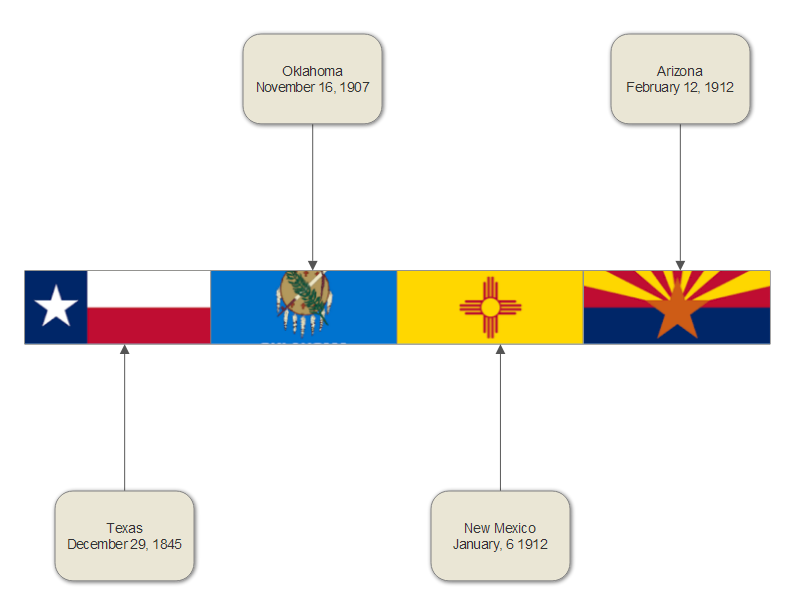
Fellow classmate, Stephanie Gilbert's, lesson plan presentation integrated using online resource SmartDraw. Here is the Southwest Statehood Timeline that I created in class using this student-centered technology in the classroom resource:

After a brief free trial, students can use this resource to create several different artifacts that can be used to evaluate their learning with a subscription fee. Here's a quick video that shows some of the things that you can create using this site:


Global Digital Citizenship


Wednesday, November 2, 2016

Resource Integration Presentation (Refection Included)


Integrating Pixie in the Classroom Presentation

Reflection:

Integrating Pixie into the classroom is appropriate for elementary learning environments for all students. The program was designed to engage students in curriculum projects from kindergartners until 5th grade. My presentation included displaying and discussing artifacts that students can create using this resource throughout all elementary grade levels. Pixie was designed by Tech4Learning to be used by diverse learners in all learning environments. I would not recommend integrating this software into the classroom for students if the teacher has not spent time familiarizing their self with the technology first. While the software provides Universal Design for Learning for all students, teachers can modify usage of the technology to support students with both learning and emotional needs. 
"Wixie and Pixie provide platforms for students to showcase their ideas and feelings using the same tool as their peers." -Tech4Learning
Whether teachers have students that fall on the Autism Spectrum, have social-emotional disorders, speech disorders, are second-language learners, every exceptional child will be able to demonstrate and showcase their learning through this software. The software even offers settings and options that teachers can use to simplify students' activities, and/or add text and audio instructions.

Even though the possibilities appear to be endless with integrating this technology into the classroom for students to use, one must remember that it is technology and even with having the best lesson plan, technology can fail! So while planning on students using this software to create digital stories, book covers, book trailers, reading comprehension boards, and much, much more, it would always be in the best interest of the students to have a backup plan just in case the internet/WiFi is down, the software can't be accessed, requires a manual update, or another team member checked out the student devices if your school isn't one-to-one.

Tuesday, November 1, 2016

Technology and I

"Technology is just a tool. In terms of getting the kids working together and motivating them, the teacher is the most important." - Bill Gates

My Philosophy of Education:

As a professional educator, I will best serve my students as individuals through an equitable education for all children by providing student-centered, hands-on learning experiences that will stimulate critical thinking in order to develop students’ problem-solving skills. My goal is to create as many opportunities as possible to learn collectively along with my students by ultimately establishing a learning community that involves the students, their families, the community, and myself. To ensure students success, I will endeavor to make learning not only relevant and meaningful, but also fun! I find this to be most achievable by forging relationships with my students to incorporate their interest into lesson planning so that students are included within their curriculum for engagement, in addition to including their goals and expectations into their learning progress to build their sense of self-accountability.

My Personal Experiences with Technology:  

Technology is major component of my everyday life, both at home and in the classroom- from tutorials on Do-It-Yourself projects, live-streaming television shows, looking up new recipes, reading ebooks, participating in a distance educational program with ITV (instructional television),  participating in virtual field trips, accessing etexts for coursework studies, and even utilizing the Promethean Board with primary elementary students, my own personal technological repertoire continues to grow.  I definitely utilize technology as a tool for entertainment, learning, and teaching. Through my own personal experiences, I can relate to how the usage of technology can be a blessing through making tasks easy and fun, to a burden when technology fails with internet interruptions or requiring assistance from tech support. While there have been instances where I have felt completely overwhelmed with being required to learn new technological advancements, I have never been such a creature of habit that I haven't attempted to learn how to use something that is completely new and foreign.

My Outlook on "Technology Integration": 

I believe that technology integration provides the means for students to demonstrate their understanding and knowledge of content by using forms of technology. Using a classroom blog like Kidblog grants opportunities to eliminate the bulk of student journals. Students can blog their science experiments or inquiries, book reports, and publish final drafts of narratives or essay online. Formative and summative performance assessments such as researching natural disasters and digitally recording small-group newscasts can be uploaded through a classroom YouTube account. With a subscription to Glogster, students can create graphic displays for timelines, biographies, posters, collages, and so much more!

Integrating Technology in my Classroom:

Due to the fact that we continue to make technological advances, I plan on providing numerous opportunities for students to use technology in the classroom, not excluding the examples provided in the technology integration segment. Also, my classroom management and behavior plan is centered on implementing ClassDojo as a rewards incentive. ClassDojo engages students while permitting students, as well as their families, to monitor their behavior by downloading the application right on their smartphones. I can also upload pictures and videos on ClassDojo for parents to have an insider's look into their child's classroom and activities.

I also believe that students need to be granted opportunities to use technology for engagement, relevance, and to support their learning and skills. Living and teaching in a rural area where there is a high demographic of impoverished students, I believe using technology in the classroom such as virtual field trips, live video feeds, online planetariums, and online satellite Earth feeds will provide students opportunities to make connections, stimulate critical thinking, and provide a more holistic learning experience for global awareness.